
Introduction
LINDTIE is a tool designed to identify aberrant transcripts in cancer using long-read RNA-seq data generated by platforms such as Oxford Nanopore Technologies (ONT) and PacBio. It extends beyond canonical gene fusions to capture the full spectrum of cancer transcriptome rearrangements, including fusion, transcribed structural variant (TSV), and novel splice variant (NSV). The pipeline accepts raw transcriptome (RNA-seq) FASTQ files from case and control samples and produces TSV files containing the novel variants it identifies.
LINDTIE uses a hybrid strategy that integrates reference-free de novo assembly with reference-guided assembly, combined with differential transcript expression analysis, to uncover previously uncharacterised transcripts. The workflow consists of four core procedures: assembly, quantification, differential expression analysis, and annotation.
LINDTIE is implemented in Nextflow, providing users with enhanced control over pipeline execution, including the ability to interrupt runs, adjust parameters from the command line, and resume analyses from previous checkpoints.
git clone https://github.com/DavidsonGroup/LINDTIE.git & modify nextflow.configcases/ & controls/nextflow runPipeline Overview
LINDTIE employs a one-to-N case–control design and a four-stage analysis workflow to identify aberrant transcripts from long-read RNA-seq data. Understanding this workflow helps you interpret results and troubleshoot issues.
Workflow Diagram
Installation + Configuration
Prerequisites
LINDTIE is built using Nextflow.
Before running the pipeline, ensure that the following are installed or available on your Linux-based system:
- Nextflow
- A container engine: Singularity / Apptainer (recommended for HPCs) or Docker
Many HPC systems provide Nextflow and Singularity as environment modules. If your system uses modules, you can check availability with module avail and load them with a command such as: module load nextflow/<version> singularity/<version>
Installing from GitHub
Clone the LINDTIE repository:
git clone https://github.com/DavidsonGroup/LINDTIE.gitConfiguration
Navigate to the LINDTIE base directory to begin configuring the pipeline:
cd LINDTIEEdit the Nextflow configuration file (nextflow.config), located in the LINDTIE base directory:
i. Process Configuration (Executor, Queue, and Resource Profiles)
Under the process block in nextflow.config, you can specify the executor used by your HPC system, the queue to submit jobs to, and resource profiles for different types of tasks.
Select an HPC executor and queue:
Choose an appropriate Nextflow executor (e.g., slurm, pbs, sge, lsf, local, etc.) supported by your compute environment. The default configuration supplied with LINDTIE is optimized for WEHI's Milton HPC, which uses the SLURM workload manager. Refer to the Nextflow documentation for the full list of available executors.
Example (default SLURM configuration):
// Process execution configuration – modify as required
process {
  executor = 'slurm'
  queue  = 'regular'           // default SLURM queue
  cache  = 'lenient'
  errorStrategy = 'retry'      // default retry failed tasks
}
For further details on customizing Nextflow configuration files, see the official documentation.
Resource Profiles with Labels:
LINDTIE assigns resource requirements to tasks using Nextflow labels. The default settings allocate resources appropriate for typical HPC environments, but you may reduce or increase these values depending on your system’s available resources.
Example (default label-specific resource settings):
// Configuration for short-running, lightweight tasks
withLabel: 'process_short' {
  cpus   = 1
  memory = 4.GB              // 4 GB RAM
  time   = 1.h               // 1-hour time limit
}

// Configuration for moderately intensive tasks
withLabel: 'process_medium' {
  cpus   = 8
  memory = 16.GB             // 16 GB RAM
  time   = 8.h               // 8-hour time limit
}

// Configuration for long-running, resource-heavy tasks
withLabel: 'process_long' {
  cpus   = 16
  memory = 64.GB             // 64 GB RAM
  time   = 16.h              // 16-hour time limit
}Recommended requirements:
- CPUs = 48
- Memory = 100GB
ii. Container Download Locations
LINDTIE runs every step inside a container, so the first time you run it Nextflow downloads 13 container images — roughly 3 GB in total. You only pay this cost once; later runs reuse the downloaded images.
Two separate caches are involved, and they are easy to confuse:
| Cache | What it holds | Set with | Default location |
|---|---|---|---|
| Nextflow image store | The finished, reusable container images | NXF_SINGULARITY_CACHEDIR |
A singularity folder inside the Nextflow work directory |
| Singularity staging cache | Temporary files written while each image downloads | SINGULARITY_CACHEDIR |
$HOME/.singularity/cache |
The second one is the common cause of a failed first run. It defaults to your home directory, which on most HPC systems has a much smaller disk quota than scratch. Downloading 13 images can exhaust that quota part-way through, and the run stops with an error like:
FATAL: While pulling image from oci registry: error fetching image:
       unable to Download Image: write /home/users/<user>/.singularity/cache/oras/tmp_383209531:
       disk quota exceeded
Setting NXF_SINGULARITY_CACHEDIR alone does not prevent this, because it controls only the first cache. To avoid it, point both at a filesystem with plenty of space (scratch is usually the right choice) before launching the pipeline:
# Where the finished images are kept, so later runs do not download them again.
# Some HPC modules already set this for you -- check with: echo $NXF_SINGULARITY_CACHEDIR
export NXF_SINGULARITY_CACHEDIR=/path/to/scratch/nextflow/singularity_cache

# Where Singularity writes temporary files while downloading.
# This is the one that defaults to your home directory.
export SINGULARITY_CACHEDIR=/path/to/scratch/nextflow/singularity_stage
export APPTAINER_CACHEDIR="$SINGULARITY_CACHEDIR"  # for clusters that use Apptainer

mkdir -p "$NXF_SINGULARITY_CACHEDIR" "$SINGULARITY_CACHEDIR"
Replace /path/to/scratch with a directory you can write to that has several GB free. The included test_case/run_LINDTIE.sh script already contains these lines as an example.
- Some HPC sites set
NXF_SINGULARITY_CACHEDIRfor you as part of their Nextflow module. Runecho $NXF_SINGULARITY_CACHEDIRafter loading the module — if it already points at scratch, you only need to setSINGULARITY_CACHEDIR. - If
NXF_SINGULARITY_CACHEDIRis not set, Nextflow says so at the start of the run:WARN: Singularity cache directory has not been defined, along with the path it will use instead. - These are environment variables, so they must be exported in the shell or job script that launches Nextflow. Putting them in
nextflow.configwill not work. APPTAINER_CACHEDIRis included because some clusters provide Apptainer (a rename of Singularity) under thesingularitycommand. Setting both covers either case.- The staging cache is only used while downloading, so it is safe to delete once a run has completed successfully. The image store is worth keeping.
Setting Up References
Download the compressed pre-built reference package from Zenodo (1.06GB):
curl -O https://zenodo.org/records/18531809/files/LINDTIE_ref.tar.gz

# decompress the tar.gz file and remove the tar.gz file
tar xzf LINDTIE_ref.tar.gz && rm LINDTIE_ref.tar.gz
This will generate a ref directory containing the seven required reference files. Ensure that the ref directory is placed inside the LINDTIE base directory:
LINDTIE/
└── ref/
    ├── chess3.0_with_HTLV1_HPV_HBV_HIV1_HIV2_EBV.fa
    ├── chess3.0_with_HTLV1_HPV_HBV_HIV1_HIV2_EBV.gtf
    ├── chess3.0_with_HTLV1_HPV_HBV_HIV1_HIV2_EBV.info
    ├── Cosmic_CancerGeneCensus_v103_GRCh38_tier_fusion.tsv
    ├── hg38_splice_junctions.bed
    ├── hg38_with_HTLV1_HPV_HBV_HIV1_HIV2_EBV.fa
    └── tx2gene.txt
The reference comprises both human and viral sequences, including viruses known to integrate into the host genome, such as HTLV-1 (NC_001436.1), HPV (NC_027779.1), HBV (NC_003977.2), HIV-1 (NC_001802.1), HIV-2 (NC_001722.1), and EBV (NC_009334.1).
Running LINDTIE
In the directory where you will run LINDTIE, create the required cases and controls subdirectories:
mkdir -p cases
mkdir -p controls
Input Files
Allocate the long-read RNA-seq data in FASTQ or FASTA format (can be gzipped) into the appropriate directories for your case and control samples.
Cases refer to the cancer samples in which you want to identify variants, while controls are used as the reference for comparison. Ideally, control samples should be benign tissue of the same type as the primary tumour. If this is not feasible, such as in blood cancers, acceptable alternatives include remission samples or samples from other individuals, ideally of the same cancer type.
Including more controls increases statistical power; aim for a minimum of 1 control, with 2-5 controls being optimal.
Run LINDTIE with Nextflow
Run LINDTIE with one of the following commands:
nextflow run LINDTIE/main.nf -params-file LINDTIE/params.yaml -profile singularitynextflow run LINDTIE/main.nf -params-file LINDTIE/params.yaml -profile dockerChoose the appropriate value for -profile based on the container engine supported by your system (singularity or docker).
You can also run nextflow run LINDTIE/main.nf --help to see all available options and parameters.
Submitting the Nextflow Script as a Job
A more effective approach than launching the Nextflow driver job from the login node is to wrap the Nextflow run command in a script and submit the workflow as a job.
A run_LINDTIE.sh template bash script is provided in the test_case directory:
#!/bin/bash

#SBATCH --job-name=run_LINDTIE
#SBATCH --partition=regular
#SBATCH --ntasks=1
#SBATCH --ntasks-per-node=1
#SBATCH --cpus-per-task=1
#SBATCH --mem=8G
#SBATCH --time=24:00:00
#SBATCH --mail-type=BEGIN,END,FAIL
#SBATCH --mail-user=your-email@example.com
#SBATCH --output=script_output/%x_%J.out
#SBATCH --error=script_output/%x_%J.err

# Exit on the first failure. Without this, a broken environment still exits 0 and
# SLURM reports the job as successful despite having done nothing.
set -euo pipefail

# `module` is a shell function, and sbatch runs a non-login shell, so the module
# system must be initialised explicitly. Adjust for your site if needed
# (Lmod clusters use /usr/share/lmod/lmod/init/bash).
source /etc/profile.d/modules.sh

module load nextflow/25.04.2 singularity/4.1.5

# ----------------------------------------------------------------------------
# Where container images are downloaded
#
# LINDTIE runs each step inside a container, so the first run downloads 13
# container images (roughly 3 GB in total). Two separate caches are involved:
#
#   1. The finished images. On this cluster the `nextflow` module already
#      places these on scratch for you (via NXF_SINGULARITY_CACHEDIR), so
#      there is nothing to do. On other systems, set that variable yourself.
#
#   2. A temporary staging area that Singularity uses *while* downloading.
#      This one defaults to your home directory (~/.singularity/cache), which
#      usually has a small disk quota. Once it fills up, downloads fail
#      part-way through with "disk quota exceeded".
#
# The lines below move that staging area onto scratch, where there is room.
# Change the path to somewhere with plenty of free space on your own system.
# It is only needed while downloading, so it is safe to delete afterwards.
# ----------------------------------------------------------------------------
export SINGULARITY_CACHEDIR=/vast/scratch/users/$USER/nextflow/singularity_stage
export APPTAINER_CACHEDIR="$SINGULARITY_CACHEDIR"  # for clusters that use Apptainer
mkdir -p "$SINGULARITY_CACHEDIR"

# modify the path to the LINDTIE base directory
LINDTIE_dir=/path/to/your/LINDTIE

nextflow run "$LINDTIE_dir/main.nf" -params-file "$LINDTIE_dir/params.yaml" -profile singularity
Fine Tuning Parameters
Adjust these parameters based on your sample characteristics and analysis requirements. Parameters marked with ⭐ are commonly modified.
| Parameter | Description | Default | Options/Format | Category |
|---|---|---|---|---|
⭐ assembly_mode |
Determines the assembly strategy used by the pipeline.
|
hybrid |
"hybrid", "denovo", "denovo_subset", or "ref_guided" |
Assembly |
⭐ rnabloom2_preset |
Sequencing platform preset for RNA-Bloom2 assembly | (empty) | (empty) or "lrpb" |
Assembly |
⭐ minimap2_preset |
Preset configuration for Minimap2 alignment (passed to -ax) |
map-ont |
"map-ont", "map-pb", "map-hifi", or "lr:hq" |
Quantification |
⭐ subset_count |
Specifies the number of reads to subset when the "denovo_subset" mode is selected. |
NULL |
integer (e.g., 1000000) or NULL |
Assembly |
oarfish_num_bootstraps |
Number of bootstrap iterations for quantification uncertainty | 10 |
integer (e.g., 10) |
Quantification |
oarfish_growth_rate |
Oarfish EM growth rate (passed to Oarfish's --growth-rate) |
0.5 |
numeric (e.g., 0.5) |
Quantification |
RUN_DE |
Toggle to enable/disable the Differential Expression module. Requires control samples: if the controls directory holds no read files, the run automatically falls back to single-sample mode (a warning is logged, and run_parameters.log records the effective value) |
true |
true or false |
DE Analysis |
fdr |
FDR significance threshold for differentially expressed genes | 0.05 |
numeric (e.g., 0.05) |
DE Analysis |
min_cpm |
Minimum CPM required for a gene to be considered expressed | 0.5 |
numeric (e.g., 0.5) |
DE Analysis |
min_logfc |
Minimum absolute Log2 Fold Change for DE detection | 2 |
numeric (e.g., 2) |
DE Analysis |
⭐detect_viral_integration |
Toggle to enable or disable the detection of viral integration variants | false |
true or false |
Detection |
min_clip |
Minimum clipped sequence length to trigger SV detection | 20 |
integer (e.g., 20) |
Detection |
min_gap |
Minimum gap size between aligned segments for events | 7 |
integer (e.g., 7) |
Detection |
min_match |
Sequence matching quality thresholds (length,identity) | 30,0.3 |
string (e.g., "30,0.3") |
Detection |
splice_motif_mismatch |
Maximum allowed mismatches for splice motifs | 1 |
integer (e.g., 1) |
Detection |
single_sample_min_vaf |
Minimum VAF_sum_WT_TPM threshold for retaining variants when RUN_DE is false |
0.1 |
numeric (e.g., 0.1) |
Detection |
single_sample_cosmic_filter |
Require a COSMIC tier 1/2 gene or a COSMIC fusion gene (COSMIC_fusion = Yes) to retain a variant when RUN_DE is false. Set to false to keep variants outside the Cancer Gene Census |
true |
true or false |
Filtering |
max_fisher_p_val |
Maximum Fisher's exact test p-value to retain a variant; variants with a larger fisher_p_val are discarded. Automatically treated as 1 (filter disabled) when no controls are present, since the test is not meaningful without them |
0.05 |
numeric (e.g., 0.05) |
Filtering |
gene_filter |
Whitelist of specific gene symbols to include | NULL |
comma-separated gene symbols, a path to a file with one gene per line, or NULL (e.g., "TP53,BRCA2") |
Filtering |
var_filter |
Whitelist of variant types to include | NULL |
comma-separated variant types or NULL (e.g., "DEL,INS") |
Filtering |
Supporting-Read Counting Parameters
These control count_supporting_reads, which counts variant-supporting reads directly from the genome alignment (see Supporting-read counting). The defaults were tuned against simulated and real ONT data and most users should not need to change them. The reference GTF used is the existing tx_annotation parameter.
| Parameter | Description | Default | Affects |
|---|---|---|---|
supp_read_window |
Base pairs either side of a breakpoint in which to fetch candidate reads | 300 |
all signatures |
supp_read_min_anchor |
Minimum aligned base pairs on the reference side of a boundary, so a read is genuinely anchored before it crosses | 20 |
RI, EE, NE |
supp_read_through_depth |
Base pairs a read must stay aligned into the novel segment: min(segment length, this) |
100 |
RI, EE |
supp_read_min_gap |
Merge alignment gaps at or below this length, to absorb ONT indel noise | 25 |
RI, EE, NE |
supp_read_gap_merge |
Merge D/N CIGAR operations separated by at most this distance when matching a splice or deletion gap | 30 |
AS, NEJ, PNJ, DEL |
supp_read_tol |
Maximum breakpoint position tolerance (tightened automatically for smaller gaps) | 35 |
NE, AS, NEJ, PNJ, DEL |
supp_read_bp_tol |
Breakpoint tolerance for a clip position | 10 |
UN (fallback for FUS, IGR) |
supp_read_near_canonical |
A variant junction within this distance of an annotated junction is reported reliability=low — it is probably that junction shifted by a few base pairs |
10 |
AS, NEJ, PNJ, DEL |
supp_read_min_clip |
Minimum soft/hard-clip length at the breakpoint to count as support | 25 |
UN |
supp_read_inside_window |
Base pairs past the counted junction in which to look for spliced-in reads | 250 |
NE, EE |
supp_read_ins_tol |
Position tolerance for a CIGAR insertion or large soft-clip | 100 |
INS, ITD, PTD |
supp_read_split_tol |
Maximum distance between a split read's supplementary alignment (either end) and pos2 |
20000 |
FUS, IGR |
Configuration Methods
There are two ways to configure the parameters for LINDTIE:
Option 1: Edit the params.yaml file before running
- Open the
params.yamlfile located in theLINDTIEbase directory. - Modify any parameters as needed.
- Save the file and then run LINDTIE.
Option 2: Override parameters at runtime using command line arguments
- Run LINDTIE with the desired parameters using the command line.
# Default parameters for the workflow
# Assembly Mode: 'hybrid', 'denovo', 'denovo_subset', or 'ref_guided'
assembly_mode: 'hybrid'

# Tool Presets
# minimap2 presets (passed to -ax):
#   'map-ont' : Oxford Nanopore genomic reads (default)
#   'map-pb'  : PacBio CLR genomic reads
#   'map-hifi': PacBio HiFi/CCS genomic reads (v2.19+)
#   'lr:hq'   : Nanopore Q20 genomic reads (v2.27+)
minimap2_preset: 'map-ont'

# rnabloom2 presets:
#   ''       : Leave empty for ONT (default)
#   '-lrpb'  : For PacBio
rnabloom2_preset: ''

subset_count: null               # NULL for no subsetting, otherwise the number of reads to subset to
detect_viral_integration: false  # true or false (default: false)
RUN_DE: true                     # true or false (default: true)
fdr: 0.05                        # default 0.05
min_cpm: 0.5                     # default 0.5
min_logfc: 2                     # default 2
min_clip: 20                     # default 20
min_gap: 7                       # default 7
min_match: '30,0.3'              # default '30,0.3'
splice_motif_mismatch: 1         # default 1
oarfish_num_bootstraps: 10       # default 10
oarfish_growth_rate: 0.5         # oarfish -k; default 0.5
gene_filter: NULL                # default NULL (e.g. "TP53,BRCA2")
var_filter: NULL                 # default NULL (e.g. "DEL,INS")
single_sample_min_vaf: 0.1       # default 0.1
single_sample_cosmic_filter: true # true or false (default: true)
max_fisher_p_val: 0.05           # default 0.05

# Alignment-based supporting-read counting (count_supporting_reads)
supp_read_window: 300            # bp either side of a breakpoint to fetch candidate reads
supp_read_min_anchor: 20         # min aligned bp on the REFERENCE side of a boundary
supp_read_through_depth: 100     # bp a read must stay aligned INTO the novel segment
supp_read_min_gap: 25            # merge alignment gaps <= this (absorb ONT indel noise)
supp_read_gap_merge: 30          # merge D/N ops separated by <= this
supp_read_tol: 35                # max breakpoint position tolerance
supp_read_bp_tol: 10             # breakpoint tolerance for a clip position (UN)
supp_read_near_canonical: 10     # near an annotated junction -> reliability=low
supp_read_min_clip: 25           # min soft/hard-clip length for UN support
supp_read_inside_window: 250     # bp past the counted junction (NE/EE)
supp_read_ins_tol: 100           # position tolerance for insertions (INS/ITD/PTD)
supp_read_split_tol: 20000       # max split-read supplementary distance (FUS/IGR)
nextflow run LINDTIE/main.nf \
    -params-file LINDTIE/params.yaml \
    -profile singularity \
    --rnabloom2_preset "lrpb" \
    --minimap2_preset "map-pb" \
--assembly_mode "denovo"For Option 2, use a single dash (-) for Nextflow runtime options; use a double dash (--) for pipeline parameters.
Output
After running LINDTIE, a results directory (<caseName>_output) will be created. This directory is organized by analysis steps, with the final results for the sample stored in the FinalOutput folder:
<caseName>_output/
├── 01-Assembly
├── 02-Quantification
├── 03-DifferentialExpression
├── 04-Annotation
├── FinalOutput
└── run_parameters.log
FinalOutput Results
The final results produced by LINDTIE are located in <caseName>_output/FinalOutput/, which contains the following files:
<caseName>_output/FinalOutput/
├── log
├── refined_annotated_contigs.bam
├── refined_annotated_contigs.bam.bai
├── refined_annotated_contigs.fasta
├── refined_annotated_contigs.vcf
├── supporting_reads.tsv
├── vaf_estimates.txt
├── <caseName>_all_variants_ranked_results.tsv
├── <caseName>_discarded_results.tsv
└── <caseName>_results.tsv
Primary Results: <caseName>_results.tsv
This file is the primary result table. Variants with multiple annotations are collapsed, meaning each contig appears as a single row with consolidated information.
Output File Column Descriptions
| Column # | Column name | Description |
|---|---|---|
| 1 | chr1 | Chromosome for end 1 of the variant. |
| 2 | pos1 | Genomic position for end 1 of the variant. |
| 3 | strand1 | Strand (+/–) for end 1 of the variant. |
| 4 | site1_feature | The genomic feature annotation at the exact position of end 1 (e.g., CDS, UTR, intron, intergenic). |
| 5 | chr2 | Chromosome for end 2 of the variant. |
| 6 | pos2 | Genomic position for end 2 of the variant. |
| 7 | strand2 | Strand (+/–) for end 2 of the variant. |
| 8 | site2_feature | The genomic feature annotation at the exact position of end 2 (e.g., CDS, UTR, intron, intergenic). |
| 9 | variant_type | LINDTIE's estimated classification of the variant type. Refer to LINDTIE's Variant Classification for the full list of variant types. |
| 10 | other_variant_type | Consolidated variant annotations for the contig. Multiple types are separated by "|" |
| 11 | overlapping_genes | Genes overlapped by the contig. If separated by colons (":"), each gene corresponds to a different soft/hard-clipped segment. |
| 12 | sample | Sample to which this variant belongs. |
| 13 | varsize | Size of the variant on the reference genome. |
| 14 | supporting_read_count | Number of case reads whose alignment carries this variant's signature at the breakpoint (the same evidence IGV displays). Counted by count_supporting_reads directly from the genome alignment, independently of Oarfish. Blank for a single-point extended exon, where there is no novel extension to measure. See Supporting-read counting. |
| 15 | supporting_read_count_reliability | high or low confidence in supporting_read_count. low for FUS/IGR/INS/ITD/PTD (split-read and insertion evidence warrants manual review), deletions under 15 bp, non-discriminating extended exons, junctions within supp_read_near_canonical bp of an annotated junction, and anything counted without a reference GTF. A low count is a lead to inspect in IGV, not a measurement to trust blindly. |
| 16 | other_supporting_read_count | Pipe-separated supporting_read_count of the other variants on this contig — the ones collapsed away into other_variant_type. Field i corresponds to field i of other_variant_type, so NE|NEJ|EE pairs with 209|190|0. NA where that variant has no count; blank when the contig carries only one variant. This is a delimited string, not a number — do not cast it, and read it as character: a lone NA would otherwise parse as missing. |
| 17 | spanning_reads | Number of case reads whose alignment envelope covers the counted junction — the denominator for junction_VAF, and what IGV shows as coverage at the locus. supporting_read_count ≤ spanning_reads holds by construction. |
| 18 | junction_VAF | supporting_read_count / spanning_reads: an alignment-verified, junction-local variant allele frequency. Complements VAF_sum_WT_TPM, which is gene-relative and expression-based. |
| 19 | num_reads_case | Total read counts for all transcripts associated with the contig in the case sample. |
| 20 | total_num_reads_controls | Total read counts for all associated transcripts across control samples. |
| 21 | VAF_sum_WT_TPM | Approximate variant allele frequency: TPM / (TPM + sum_WT_TPM). For variants spanning multiple genes (e.g. fusions) the wild-type denominator is the sum of the partner genes' wild-type TPM. |
| 22 | logFC | Maximum log fold change of associated transcript(s) in the case sample vs. controls. |
| 23 | FDR | Adjusted (multiple-testing corrected) p-value. |
| 24 | PValue | Minimum p-value for transcripts associated with this variant vs. controls. |
| 25 | case_gene_count_wt | Total case reads assigned to wild-type (non-novel) transcripts of the gene(s) this contig overlaps. The case wild-type cell of the Fisher contingency table. |
| 26 | control_gene_count_wt | Total control reads assigned to wild-type (non-novel) transcripts of the same gene(s). The control wild-type cell of the Fisher contingency table. |
| 27 | control_contig_count | Total control reads assigned to this contig itself. A non-zero value means the variant contig is also expressed in the controls. |
| 28 | control_gene_count_total | Total control reads across all transcripts of the gene(s), wild-type and novel combined. |
| 29 | TPM | Length-corrected transcript-per-million estimate for the variant contig. |
| 30 | sum_WT_TPM | Sum of the length-corrected TPM of all wild-type transcripts of the gene(s) associated with this contig. The denominator of VAF_sum_WT_TPM. |
| 31 | fisher_p_val | One-sided Fisher's exact test p-value for enrichment of this variant in the case relative to the controls, computed from the read counts above. Variants with p greater than max_fisher_p_val are filtered out. Not meaningful without controls — in single-sample mode the filter is disabled automatically. |
| 32 | odds_ratio | Odds ratio from the same Fisher's exact test: how much more enriched the variant is in the case than in the controls. |
| 33 | large_varsize | Indicates whether the variant size exceeds the min_clip threshold (default: 20 bp). |
| 34 | is_contig_spliced | Indicates whether the contig is spliced (i.e., contains alignment gaps). |
| 35 | spliced_exon | Indicates a novel or extended exon variant with a corresponding junction. |
| 36 | overlaps_exon | Indicates whether the variant overlaps any annotated reference exon. |
| 37 | overlaps_gene | Indicates whether the variant overlaps any annotated reference gene. |
| 38 | motif | Splice motif sequence. |
| 39 | valid_motif | Indicates whether the variant contains a valid splice motif. Some variant types (e.g., TSVs or splice events at known boundaries) are not tested. |
| 40 | COSMIC_tier | The Cancer Gene Census assessment for the genes involved. Tier 1 denotes genes with documented activity relevant to cancer; Tier 2 denotes genes with strong evidence of a role in cancer but less extensive documentation. |
| 41 | COSMIC_fusion | Indicates whether any gene involved in the event is listed in COSMIC Fusion. Yes means at least one overlapping gene is reported as a fusion partner in COSMIC; No means none are listed. |
| 42 | vars_in_contig | Number of variants detected on the aligned contig. |
| 43 | contig_id | Contig name from the de novo assembly. |
| 44 | variant_id | Assigned variant ID (matches the VCF file). |
| 45 | partner_id | For fusions or junctions with two breakpoints, this identifies the paired variant. |
| 46 | contig_varsize | Size of the variant on the contig sequence. |
| 47 | cpos | Position of the variant on the contig (independent of alignment direction). |
| 48 | unique_contig_ID | ID of the modified SuperTranscript used in visualization outputs. |
| 49 | contig_len | Length of the contig sequence. |
| 50 | contig_cigar | CIGAR string representing the contig's genome alignment (may contain two strings if soft/hard-clipped). |
| 51 | seq_loc1 | Location string for the first sequence region (e.g., contig123:100–140). |
| 52 | seq_loc2 | Location string for the second sequence region, if applicable. |
| 53 | seq1 | 40 bp sequence around the main variant site (20 bp on each side). |
| 54 | seq2 | 40 bp sequence around the second variant site (20 bp on each side; if applicable). |
| 55 | variant_score | Score used for variant prioritization. |
Supporting-Read Counting
LINDTIE reports two independent measures of how much read evidence a variant has, and neither replaces the other:
num_reads_casecomes from Oarfish and is a whole-contig abundance estimate. Because it describes the entire contig rather than the breakpoint, it can overstate support for the specific variant.supporting_read_count,spanning_readsandjunction_VAFcome from thecount_supporting_readsstep, which reads the genome alignment directly — the same alignment IGV displays. A read counts as supporting only if its alignment reproduces the variant's signature at the breakpoint, so these numbers match what you see when you open the BAM in IGV.
Reconciling the two is left to the analyst. The per-variant table is also written out in full as FinalOutput/supporting_reads.tsv, with a log at FinalOutput/log/supporting_reads.log. Because <caseName>_results.tsv keeps one row per contig, the complete per-variant counts live in <caseName>_all_variants_ranked_results.tsv; the counts the collapse would otherwise hide are preserved in other_supporting_read_count.
This step requires a genome alignment, so it is skipped in denovo assembly mode, where the supporting-read columns are left blank.
How a read is counted, by variant type
The support_signature column records which rule was applied:
support_signature |
Variant types | A read supports the variant if it… |
|---|---|---|
THROUGH |
RI | aligns through the exon→intron boundary, staying aligned min(intron length, supp_read_through_depth) bp into the retained intron |
INTERIOR |
EE | aligns through the boundary between the reference exon and the novel part of the extension, and into that extension |
INSIDE |
NE | splices into the novel exon at the junction |
GAP |
AS, NEJ, PNJ, DEL | has a gap starting near pos1 and ending near pos2 whose deleted length matches the variant, and that is not better explained by an annotated junction |
SPLIT |
FUS, IGR | is a split read whose supplementary alignment bridges pos1 and pos2 |
CLIP |
UN | soft- or hard-clips at approximately the breakpoint |
INSERTION |
INS, ITD, PTD | carries approximately varsize inserted bases near pos1. Always reliability=low, because ONT insertions align unreliably |
Accuracy rests on three structural requirements rather than on threshold tuning: the read's feature must be in the right place (position tolerance), be the right size (a 17 bp deletion is not a 1 bp ONT indel), and not be better explained by a competing reference structure — an annotated intron or a reference exon. The last two need the reference GTF (tx_annotation); without it the step falls back to position-only matching and marks the affected rows reliability=low.
<caseName>_all_variants_ranked_results.tsv
This file is an expanded version of the <caseName>_results.tsv file. This table lists all variant annotations individually, without collapsing (i.e., a contig may appear in multiple rows if it has multiple annotations). It includes all 55 columns present in <caseName>_results.tsv — including the supporting-read and Fisher enrichment columns, so this is where the complete per-variant supporting_read_count values live — plus two additional columns:
| Column # | Column name | Description |
|---|---|---|
| 56 | rank_within_contig | Rank of each annotation for a given contig based on its score; 1 = highest-scoring annotation. |
| 57 | is_primary | Indicates whether this annotation was selected as the primary variant for that contig (i.e., the entry included in <caseName>_results.tsv). |
The other_variant_type and other_supporting_read_count columns are empty in this file because each annotation is shown separately rather than consolidated.
<caseName>_discarded_results.tsv
This file contains variants filtered out due to low-complexity sequences, using the same column layout as the primary results table (supporting-read and Fisher enrichment columns included). Specifically, variants are placed in this table if the seq1 or seq2 columns contain:
- a polyA or polyT stretch of ≥ 10 bp, or
- a perfect dinucleotide repeat of ≥ 10 repeats (i.e., 20 bp total).
Visualization Files
The following files are useful for inspection in IGV to visualize alignments and examine the refined contig sequences:
refined_annotated_contigs.bam/.bam.bai: BAM and BAM index files that contain the aligned refined transcript sequences for visualization.refined_annotated_contigs.fasta: A FASTA file that contains the refined transcript sequences used in the analysis.refined_annotated_contigs.vcf: A VCF file that lists the refined variant calls.
Intermediate Files Generated at Each Step
LINDTIE produces several intermediate files throughout the pipeline. These files can be useful for troubleshooting, quality checks, or deeper inspection of specific steps.
<caseName>_output/
├── run_parameters.log
├── 01-Assembly
│   ├── denovo_read_counts.log (assembly_mode = hybrid or denovo or denovo_subset)
│   ├── rnabloom.transcripts.fa (assembly_mode = hybrid or denovo or denovo_subset)
│   ├── read_counts_summary.log (assembly_mode = hybrid or ref_guided or denovo_subset)
│   ├── confident_mapped.bam & confident_mapped.bam.bai (assembly_mode = hybrid or ref_guided or denovo_subset)
│   ├── reads_all_sorted.bam & reads_all_sorted.bam.bai (assembly_mode = hybrid or ref_guided or denovo_subset)
│   ├── reads_remainder_sorted.bam & reads_remainder_sorted.bam.bai (assembly_mode = denovo_subset)
│   ├── stringtie2_assembly.fa (assembly_mode = hybrid or ref_guided or denovo_subset)
│   └── stringtie2_assembly.gtf (assembly_mode = hybrid or ref_guided or denovo_subset)
├── 02-Quantification
│   ├── cases
│   │   ├── <caseName>.infreps.pq
│   │   ├── <caseName>.meta_info.json
│   │   └── <caseName>.quant
│   └── controls
│       ├── <controlName>.infreps.pq
│       ├── <controlName>.meta_info.json
│       └── <controlName>.quant
├── 03-DifferentialExpression
│   ├── DE_contigs.fasta
│   ├── DE_contigs_mapped_to_hg38.bam
│   ├── DE_contigs_mapped_to_hg38.bam.bai
│   ├── DE.log
│   ├── DE_MD_plot.png
│   ├── DE_MDS_plot.png
│   ├── DE_QLDisp_plot.png
│   ├── DE_transcript_full_results.txt
│   └── DE_transcript_significant.txt
└── 04-Annotation
    ├── annotated_contigs.bam
    ├── annotated_contigs.bam.bai
    ├── annotated_contigs_info.tsv
    ├── annotated_contigs.vcf
    └── annotation.log
run_parameters.log
A log file that contains the run parameters used to run LINDTIE.
01-Assembly
denovo_read_counts.log: A log file that contains the read counts for the de novo assembly. Only present when assembly_mode = denovo or denovo_subset.rnabloom.transcripts.fa: A FASTA file that contains the assembled transcript sequences produced by RNA-Bloom2. Only present when assembly_mode = hybrid or denovo or denovo_subset.read_counts_summary.log: A log file that contains the read counts summary. Only present when assembly_mode = hybrid or ref_guided or denovo_subset.confident_mapped.bam: A BAM file that contains the confident mapped reads. Only present when assembly_mode = hybrid or ref_guided or denovo_subset.reads_all_sorted.bam: A BAM file that contains all the case reads aligned to the reference genome, used for supporting-read counting. Only present when assembly_mode = hybrid or ref_guided or denovo_subset.reads_remainder_sorted.bam: A BAM file that contains the alignments of the remainder reads (those not sampled for de novo assembly), used for StringTie2 assembly. Only present when assembly_mode = denovo_subset.stringtie2_assembly.fa: A FASTA file that contains the assembled transcript sequences produced by StringTie2. Only present when assembly_mode = hybrid or ref_guided or denovo_subset.stringtie2_assembly.gtf: A GTF file that contains the assembled transcript annotations produced by StringTie2. Only present when assembly_mode = hybrid or ref_guided or denovo_subset.read_counts_summary.log: A log file that contains the read counts summary. Only present when assembly_mode = hybrid or ref_guided or denovo_subset.
02-Quantification
Files generated by Oarfish for both the case and control samples:
<sampleName>.quant: A tab-separated file that contains the quantified transcripts along with their lengths, metadata, and the estimated number of reads originating from each transcript.<sampleName>.meta_info.json: A JSON file that contains the parameters used to run Oarfish and other sample-level metadata excluding transcript quantifications.<sampleName>.infreps.pq: A Parquet file that contains estimated transcript counts, with each row representing a transcript and each column representing an inferential replicate.
03-DifferentialExpression
Files containing results from differential expression analysis of assembled transcripts:
DE_contigs.fasta: A FASTA file that contains the transcripts sequences identified as significantly differentially expressed.DE_contigs_mapped_to_hg38.bam/DE_contigs_mapped_to_hg38.bam.bai: BAM and BAM index files that contain the alignments of differentially expressed transcripts to the hg38 reference genome for visualization.DE.log: A log file that contains the log messages from the differential expression analysis.DE_MD_plot.png: A PNG file that contains the mean–difference (MD) plot of expression changes.DE_MDS_plot.png: A PNG file that contains the multidimensional scaling (MDS) plot showing sample relationships.DE_QLDisp_plot.png: A PNG file that contains the quasi-likelihood dispersion diagnostic plot.DE_transcript_full_results.txt: A text file that contains the complete statistical results for all transcripts tested.DE_transcript_significant.txt: A text file that contains the subset of transcripts identified as significantly differentially expressed.
04-Annotation
Files containing structural and functional annotations of transcripts:
annotated_contigs.bam/annotated_contigs.bam.bai: BAM and BAM index files that contain the annotated transcript alignments generated from alignment-based analysis.annotated_contigs_info.tsv: A tab-separated file that contains metadata and functional annotations for each transcript.annotated_contigs.vcf: A VCF file that contains variant calls identified during the annotation process.annotation.log: A log file that contains log messages from the annotation workflow.
The annotation stage also produces two tables that are published straight to FinalOutput/: vaf_estimates.txt (per-contig TPM, wild-type expression, VAF and the Fisher enrichment statistics) from the estimate_vaf step, and supporting_reads.tsv (per-variant alignment-verified read counts) from the count_supporting_reads step.
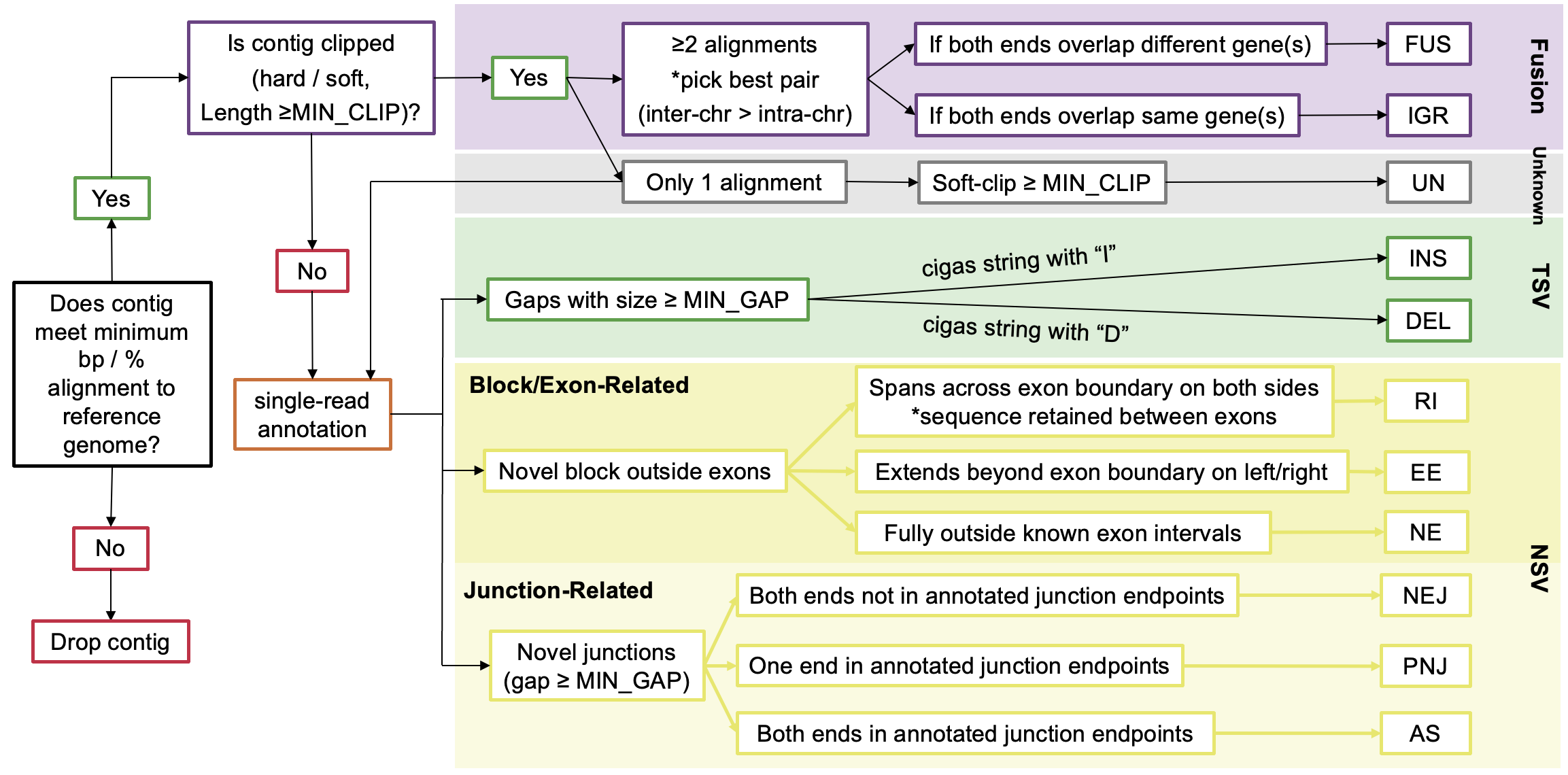
LINDTIE's Variant Classification
The following are the variant types identified and classified by LINDTIE:
| Variant Type | Full Name | Description | Condition |
|---|---|---|---|
| FUS | Fusion | Inter-chromosomal or distant intra-chromosomal rearrangement | When two reads from the same contig map to different genomic locations with clipping events |
| IGR | Intra-Genic Rearrangement | Rearrangement within the same gene | When both parts of a fusion occur within the same gene(s) |
| UN | Unknown | Soft-clipped sequence of unknown origin | When soft-clipped sequence is present but not part of a fusion event |
| INS | Insertion | Sequence inserted relative to the reference | When CIGAR contains an insertion operation with size ≥ MIN_GAP |
| DEL | Deletion | Sequence deleted relative to the reference | When CIGAR contains a deletion operation with size ≥ MIN_GAP |
| EE | Extended Exon | Extension of known exonic sequence | When a novel block extends beyond existing exon boundaries (either left or right side) |
| NE | Novel Exon | Completely novel exonic sequence | When a novel block doesn't overlap any known exonic regions |
| RI | Retained Intron | Intronic sequence retained in the transcript | When a novel block spans between two exons (has both left and right exonic boundaries) |
| AS | Alternative Splicing | Alternative splicing event using known splice sites | When both ends of a junction match known splice sites but the combination is novel |
| NEJ | Novel Exon Junction | Completely novel splice junction | When neither end of a novel junction matches known splice sites |
| PNJ | Partial Novel Junction | Junction with one known and one novel splice site | When only one end of a novel junction matches known splice sites |
LINDTIE's variant classification rules and filtering logic are based on the following criteria:
LINDTIE's Variant-Specific Criteria
The following are the variant-specific criteria used by LINDTIE to classify the variants:
| Variant Type | Full name | Category | Clipping | Spliced Contig1 | Variant Size | Overlaps Gene | Overlaps Exon | Spliced Exon2 | Valid Motif3 |
|---|---|---|---|---|---|---|---|---|---|
| FUS | Fusion | Fusion | hard/soft | - | >min_clip | ✅️ | - | - | - |
| IGR | Intra-Genic Rearrangement | Fusion | hard/soft | - | >min_clip | ✅️ | - | - | - |
| UN | Unknown | Unknown | soft | - | >min_clip | ✅️ | - | - | - |
| INS | Insertion | TSV | - | ✅️ | >min_gap | ✅️ | ✅️ | - | - |
| DEL | Deletion | TSV | - | ✅️ | >min_gap | ✅️ | ✅️ | - | - |
| RI | Retained Intron | NSV | - | ✅️ | >min_clip | ✅️ | ✅️ | - | - |
| EE | Extended Exon | NSV | - | ✅️ | >min_clip | ✅️ | ❌ | ✅️ | ✅️ |
| NE | Novel Exon | NSV | - | ✅️ | >min_clip | ❌ | ❌ | ✅️ | - |
| NEJ | Novel Exon Junction | NSV | - | ✅️ | >min_gap | ✅️ | ✅️ | ✅️ | ✅️ |
| PNJ | Partial Novel Junction | NSV | - | ✅️ | >min_gap | ✅️ | ✅️ | ✅️ | ✅️ |
| AS | Alternative Splicing | NSV | - | ✅️ | >min_gap | ✅️ | ✅️ | - | - |
[1] Spliced Contig: Any alignment containing a splice (≥1 gap)
[2] Spliced Exon: EE/NE variants that have adjacent supporting junctions, and for selected junction variants themselves.
[3] Valid Motif: True when the 2-bp splice motifs at the relevant boundaries match canonical GT-AG (or CT-AC on the opposite strand) within the allowed mismatch tolerance
LINDTIE’s Scoring System
LINDTIE's scoring system is based on the following criteria:
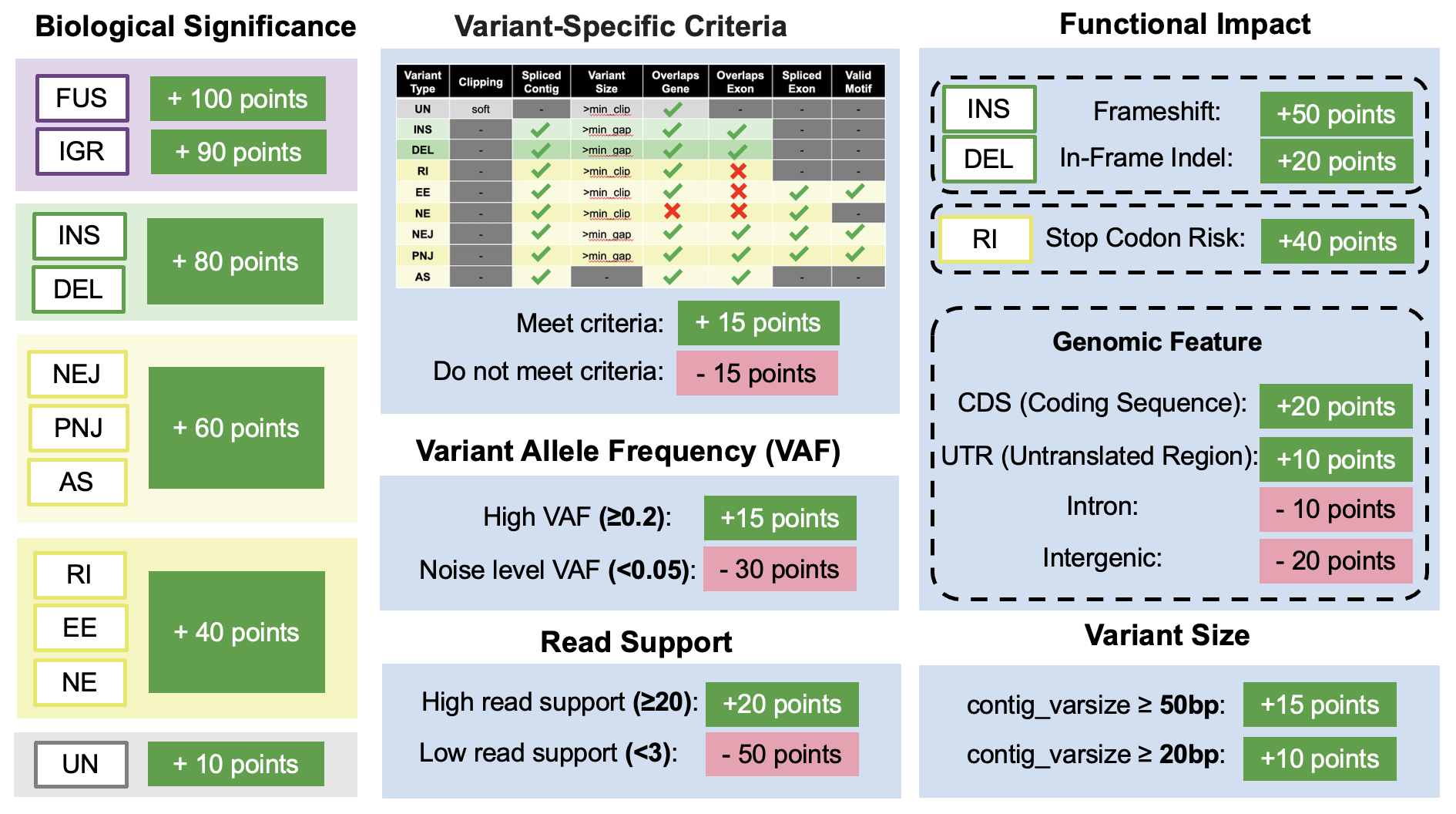
The evidence component of the score uses num_reads_case and VAF_sum_WT_TPM, so scoring is applied only after the differential expression and VAF tables have been merged in — before that, both values would be unavailable and the term would contribute nothing.
Resume Your Run
You can easily resume your run in case of changes to the parameters or inputs using -resume. Nextflow will try to not recalculate steps that are already done:
nextflow run LINDTIE/main.nf -params-file LINDTIE/params.yaml -resumeOnly a single dash (-) is needed for the resume flag.
Nextflow will need access to the working directory where temporary calculations are stored. Per default, this is set to work but can be adjusted via -w /path/to/any/workdir. In addition, the .nextflow.log file is needed to resume a run, thus, this will only work if you resume the run from the same folder where you started it.
Testing LINDTIE
Example test data is included to help you quickly verify that the pipeline is running correctly. The test set contains one case sample and two control samples, located in the test_case directory under the LINDTIE base directory:
LINDTIE/
└──test_case/
		├── cases
		│   └── test-case.fastq.gz
		├── controls
		│   ├── test-control0.fastq.gz
		│   └── test-control1.fastq.gz
		└── run_LINDTIE.sh
You can test LINDTIE either by running the following command directly in the terminal or by executing the provided run_LINDTIE.sh script (make sure to modify the path):
# modify the path to the LINDTIE base directory
LINDTIE_dir=/path/to/your/LINDTIE

nextflow run $LINDTIE_dir/main.nf -params-file $LINDTIE_dir/params.yaml -profile singularity
Approximate run time: 12 minutes, once the containers have been downloaded. Allow extra time on the first run, when Singularity or Docker must pull the images.
Once LINDTIE has finished running, you should see output on the terminal similar to the following:
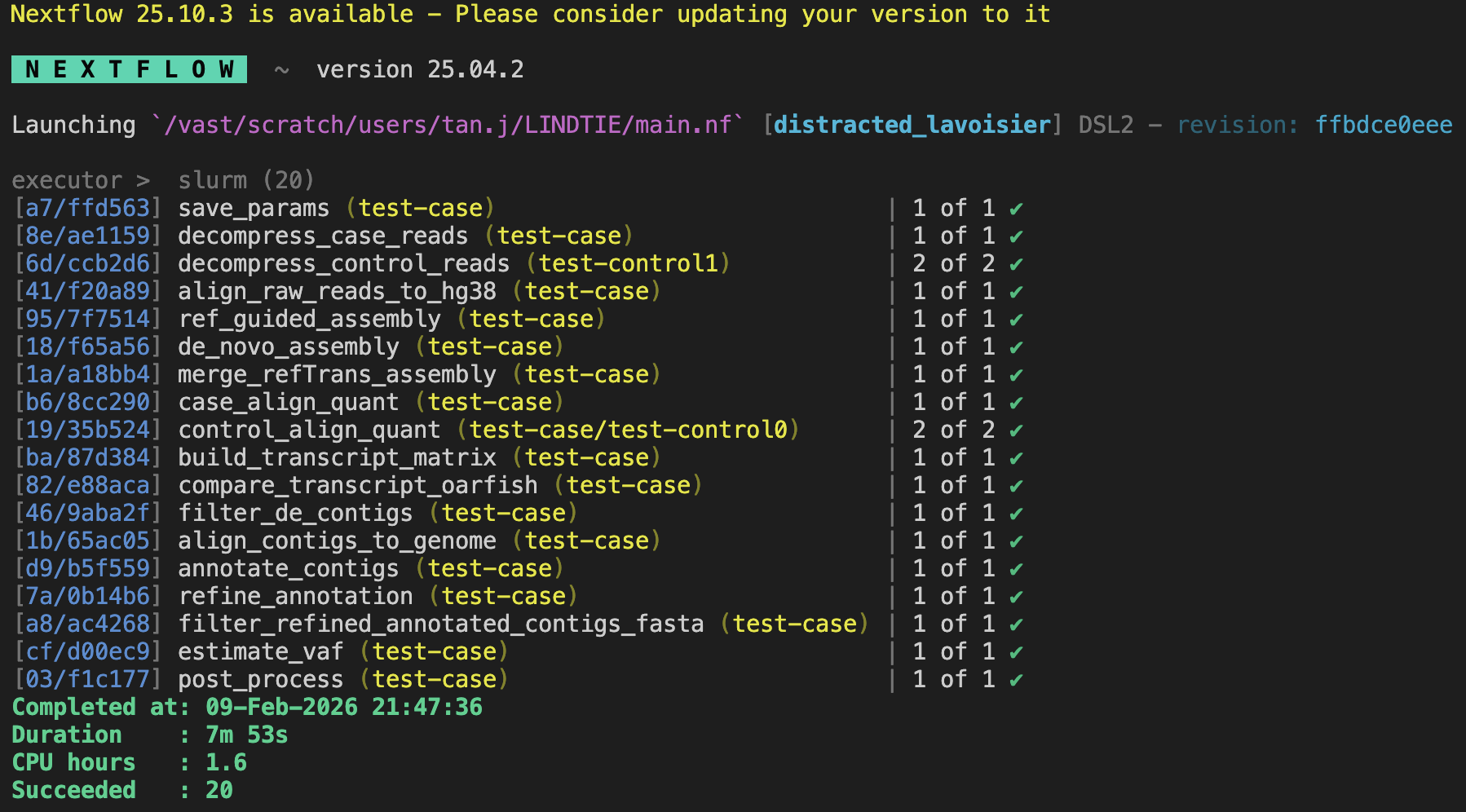
View the collapsed results at: test-case_output/FinalOutput/test-case_results.tsv
The table below summarizes the number of variants detected for each variant type in the test case:
| Variant Type | Count |
|---|---|
| AS | 5 |
| DEL | 6 |
| EE | 5 |
| FUS | 30 |
| IGR | 1 |
| INS | 19 |
| NE | 1 |
| NEJ | 4 |
| PNJ | 11 |
| RI | 4 |
| UN | 3 |
| TOTAL | 89 |
The exact counts may vary between runs. The de novo assembly step (RNA-Bloom2) is not fully deterministic, so the assembled transcripts and therefore the final variants detected may differ slightly each time. However, the overall results should remain broadly consistent.
Examples of Use
Detailed examples and use cases are currently being prepared. Check back soon for comprehensive tutorials and real-world applications of LINDTIE.
Best Practices
Best practices will be added in future releases. Please check back for updates or visit the GitHub repository for the latest information.
Full List of Tools Used in LINDTIE
Listed below are all software tools and version numbers packaged within the Nextflow container used by LINDTIE:
bioconda::rnabloom=2.0.1
bioconda::gffread=0.12.7
bioconda::stringtie=2.2.3
bioconda::minimap2=2.30
bioconda::samtools=1.22
bioconda::bbmap=39.52
bioconda::oarfish=0.10.1
bioconda::bio=1.8.0
bioconda::pysam=0.23.3
bioconda::pybedtools=0.12.0
bioconda::bioconductor-edger=4.4.0
bioconda::bioconductor-tximport=1.34.0
conda-forge::pandas=2.3.0
conda-forge::numpy=2.3.0
conda-forge::intervaltree=3.1.0
conda-forge::r-dplyr=1.1.4
conda-forge::r-data.table=1.17.6
conda-forge::r-tidyr=1.3.2
conda-forge::r-jsonlite=2.0.0
conda-forge::r-readr=2.1.5
conda-forge::r-arrow=19.0.1
Glossary of Terms
This glossary defines key terms used throughout the LINDTIE documentation and output files.
General Terms
- Aberrant Transcript
- A transcript that differs from the normal reference transcriptome, potentially caused by genomic rearrangements, novel splicing, or other alterations. In cancer, aberrant transcripts may drive tumor growth or serve as biomarkers.
- Contig
- A contiguous sequence assembled from overlapping reads. In LINDTIE, contigs represent assembled transcript sequences that are then analyzed for variants.
- De Novo Assembly
- The process of assembling reads into contigs without using a reference genome. This approach can detect novel sequences not present in the reference.
- Fusion Transcript
- A chimeric RNA molecule containing sequences from two different genes, typically resulting from chromosomal rearrangements. Examples include BCR-ABL in CML and EML4-ALK in lung cancer.
- Long-read RNA-seq (lrRNA-seq)
- RNA sequencing using technologies that produce reads thousands of bases long (ONT, PacBio), enabling full-length transcript sequencing and better detection of structural variants.
- Splice Motif
- The conserved sequence at splice junctions. The canonical splice motif is GT-AG (GT at the 5' donor site, AG at the 3' acceptor site). LINDTIE validates splice junctions against known motifs.
Statistical Terms
- CPM (Counts Per Million)
- A normalization method that scales raw read counts to per-million reads, allowing comparison between samples with different sequencing depths. Formula: CPM = (read count / total reads) × 1,000,000
- FDR (False Discovery Rate)
- The expected proportion of false positives among all significant results. An FDR of 0.05 means 5% of significant results are expected to be false positives. Lower FDR = higher confidence.
- logFC (Log Fold Change)
- The log2-transformed ratio of expression between case and control samples. A logFC of 2 means 4x higher expression in cases; logFC of -2 means 4x lower expression in cases.
- P-value
- The probability of observing the data (or more extreme) if there is no true difference between groups. Lower p-values indicate stronger evidence against the null hypothesis.
- TPM (Transcripts Per Million)
- A normalization method that accounts for both sequencing depth and transcript length, making values comparable across samples and genes. More appropriate than CPM for comparing expression levels of different transcripts.
- VAF (Variant Allele Frequency)
- The proportion of reads supporting the variant allele versus the total reads at that position. Higher VAF suggests the variant is present in more cells (clonal) rather than a subclonal event.
Output Field Terms
- CIGAR String
- A compact representation of how a sequence aligns to a reference. Characters include: M (match/mismatch), I (insertion), D (deletion), N (skipped region/intron), S (soft clip). Example: "100M50N100M" = 100 bases match, 50 base intron, 100 bases match.
Benchmarking & Performance
Benchmarking data will be added in future releases. Please check back for updates or visit the GitHub repository for the latest information.
Troubleshooting
If you encounter issues not covered here, please:
- Check the GitHub issues page
- Review the Nextflow documentation
- Open a new issue on GitHub with detailed information about your problem
Common troubleshooting tips and solutions will be added as they are identified by the community.
Frequently Asked Questions
This section will be populated with frequently asked questions as they arise from the community. In the meantime, please refer to the documentation sections or open an issue on GitHub for specific questions.
Changelog
This page documents all notable changes to LINDTIE. The format is based on Keep a Changelog, and this project adheres to Semantic Versioning.
v0.2.2
Released: 2026
A patch release fixing variant scoring and primary-variant selection, the gene_filter and var_filter options, and supporting-read counting in denovo_subset mode. Scores for FUS, IGR and UN variants change, so results are not directly comparable with earlier versions.
Changed
- In
denovo_subsetmode, all case reads are now aligned to the genome. Previously only the remainder reads (those not sampled for de novo assembly) were aligned, sosupporting_read_countmissed the reads in the de novo subset. StringTie2 still assembles only the remainder reads, whose alignments are extracted by a newextract_remainder_bamstep and published asreads_remainder_sorted.bam. On the test case (15,539 reads, 5,000 subsampled), the total number of supporting reads rose from 2,130 to 3,048. single_sample_cosmic_filternow also keeps known COSMIC fusion genes. Previously a variant was kept only if an overlapping gene was COSMIC tier 1/2, so variants whose genes are listed as COSMIC fusion partners but are untiered (COSMIC_fusion= Yes, emptyCOSMIC_tier) were dropped. A variant is now kept if it has a tier 1/2 gene or a COSMIC fusion gene.
Fixed
- Two scoring terms were never applied. The clip check for FUS, IGR and UN, and the inter-chromosomal check for FUS and IGR, read columns that do not exist when scoring runs. Every FUS, IGR and UN therefore lost 15 points for "no clipping", and every FUS and IGR received the −20 read-through penalty and never the +40 translocation bonus. Scores are now computed from
contig_cigarand the breakpoint chromosomes. Clipped FUS, IGR and UN variants gain 30 points, and inter-chromosomal fusions gain a further 60. The primary variant chosen for a contig can change as a result. - The read-through penalty now applies to FUS only. The +40 inter-chromosomal bonus and −20 read-through penalty were also applied to IGR, which is intra-genic and therefore always on one chromosome, so every IGR lost 20 points. IGR scores are 20 points higher than before.
- The primary variant of a contig could depend on input order. The primary variant is chosen before read counts and VAF are merged. The missing values cost every candidate the same 80 points, which only cancels out if the score is not floored at zero, so weak candidates tied at 0 and the first one listed was kept. The ranked all-variants table could then flag a different primary variant. Variants are now ranked on the unfloored score in both places; the reported
variant_scoreis still floored at 0. gene_filterandvar_filterdid not accept comma-separated values as documented. A gene list such as"TP53,BRCA2"was treated as a file path and silently ignored, and"DEL,INS"matched no variant type, so every variant was removed. Both now accept comma-separated values, andgene_filteralso accepts a file with one gene per line. A missing gene-list file, or avar_filterwith no valid variant types, now stops the run with an error.
Documentation
- The
--tolhelp text of the supporting-read script now gives the gap tolerances the code uses: position min(tol, max(10, 20% of the gap)) and size min(25, max(3, 10% of the gap)). - The
seq1/seq2output columns are described as 40 bp (20 bp either side of the variant site), and thelarge_varsizedefault as 20 bp, matching the code.
v0.2.1
Released: 2026
A patch release fixing problems that prevented LINDTIE from starting, or from running correctly, outside the environment it was developed in, plus a large speed-up of the supporting-read counting step. No analysis logic changed, with one exception noted below.
Changed
- Supporting-read counting now runs in parallel. The per-variant loop in
count_supporting_readsis distributed across worker processes via a new--threadsoption, which the pipeline sets automatically from the CPUs allocated to the step. The counting logic is untouched and results are byte-identical at any thread count, because workers return their rows in input order. - This matters because the per-variant cost is very uneven: on a mitochondria-rich sample the chrM variants carry 10,000-120,000 spanning reads each against a median of around 116 elsewhere, and because the input is ordered by chromosome with chrM last, one observed single-sample run spent 1 h 53 m on its first 43,000 variants and 8 h 45 m on the remaining 4,848.
- The wall-time limit for
count_supporting_readswas raised to 24 hours, set through awithNameselector innextflow.config. Single-sample runs have no differential expression step to narrow the candidate list first, so tens of thousands of variants reach this step rather than a few hundred.
Fixed
- The pipeline failed to compile on Nextflow 24.10.5 and earlier, including the version many sites load by default, with
Variable `Channel` already defined in the process scope. Thedenovosupporting-reads fallback declared a local variable in a way older Nextflow parsers reject; it is now written inline. Verified working on 22.10.4 through 25.10.0. - Container steps could not find the pipeline's own helper scripts. The scripts under
modules/code_baseare referenced by host path rather than staged as task inputs, so Singularity'sautoMountsnever bound them, and steps whose inputs all lived in the work directory failed withNo such file or directory. Both the Singularity and Docker profiles now bind the project directory explicitly, sonextflow.configno longer depends on a site-wide configuration to work. - Differential expression with a single control ignored the
min_cpmfilter. The exact-test branch used the unfiltered count matrix while the quasi-likelihood branch used the filtered one, so single-control runs tested every transcript — including those below the CPM cutoff — which also inflated the multiple-testing correction. Single-control results from earlier versions are not comparable with those from this release. test_case/run_LINDTIE.shcalledmodule loadwithout initialising the module system, which fails whenever the submitting shell has not exported themodulefunction. It now initialises the module system explicitly and aborts on the first error instead of continuing with an unusable environment.- Container downloads could exhaust the home disk quota. Singularity stages downloads in its own cache, which is separate from
NXF_SINGULARITY_CACHEDIRand defaults to the home directory, so fetching LINDTIE's 13 images could fill the quota part-way through. The example job script now redirects that staging cache, and the documentation explains both caches.
Removed
- The
env { NXF_JVM_ARGS }block fromnextflow.config, and the documentation describing it. Nextflow's own environment variables are read by the launcher before the JVM starts, so setting them in a configuration file that the JVM parses afterwards has no effect. Export them in the shell or job script instead.
Documentation
- Repository links updated to DavidsonGroup/LINDTIE, and Nextflow links to the current documentation site.
- Control-sample guidance revised: a minimum of 1 control, with 2-5 being optimal.
- Test-case variant counts and expected run time refreshed against a current run.
- New section on container download locations, and the job-script template synchronised with the shipped script.
v0.2.0
Released: 2026
The columns of <caseName>_results.tsv have changed, in both names and order. If you have downstream scripts that read this table, note in particular that VAF is now VAF_sum_WT_TPM (and is computed against a different denominator), mean_WT_TPM is now sum_WT_TPM, and is_coding has been removed — it is derived from site1_feature/site2_feature, so use site1_feature == "CDS" || site2_feature == "CDS" instead. Select columns by name rather than by position.
Added
- Alignment-based supporting-read counting (
count_supporting_reads): counts, per variant, the case reads whose alignment carries the variant's signature at the breakpoint — the same evidence IGV displays — independently of Oarfish's whole-contig abundance. Adds thesupporting_read_count,supporting_read_count_reliability,other_supporting_read_count,spanning_readsandjunction_VAFcolumns, and publishesFinalOutput/supporting_reads.tsv. Skipped indenovoassembly mode, which has no genome alignment. - Fisher's exact enrichment test for each variant, comparing case and control read counts per gene. Adds the
fisher_p_val,odds_ratio,case_gene_count_wt,control_gene_count_wt,control_contig_countandcontrol_gene_count_totalcolumns, and themax_fisher_p_valparameter (default0.05). VAF_sum_WT_TPMandsum_WT_TPM: a variant allele frequency whose wild-type denominator is the sum of the partner genes' expression, which matters for multi-gene events such as fusions.single_sample_cosmic_filterparameter (defaulttrue): the COSMIC tier 1/2 requirement in single-sample mode can now be switched off to retain variants outside the Cancer Gene Census.oarfish_growth_rateparameter (default0.5), exposing Oarfish's--growth-rate.- Twelve
supp_read_*parameters controlling supporting-read counting. - Per-sample TPM in the differential expression step (via tximport), plus a case-vs-control TPM-ratio filter requiring a fold change of at least
2^min_logfcagainst every control. AddsTPM_<sample>andTPM_ratio_*columns to the DE result tables. vaf_estimates.txtis now published toFinalOutput/.
Changed
- Oarfish upgraded from 0.8.1 to 0.10.1. The case quantification container no longer bundles qualimap, which was never invoked.
- Results column order reorganised: breakpoint and genomic-feature columns are grouped together, read-support and statistical columns follow, and identifier and sequence columns move to the end.
- VAF is now computed for all annotated contigs rather than only those flagged as variants of interest, so read counts and VAF are no longer missing for lower-ranked variants.
- Variant scoring now runs after the differential expression and VAF tables are merged in. Previously the read-count and VAF terms always saw their zero defaults, applying a constant penalty to every row and contributing no information to the ranking.
- An empty result set now emits the same header as a populated run, instead of a bare empty file.
Removed
VAF,mean_WT_TPMandis_codingcolumns from the results tables (see the note above).
Fixed
RUN_DEfallback never took effect. When no control reads were present the pipeline logged that it was switching to single-sample mode but then ran the DE path anyway, because Nextflow silently ignores reassignment ofparamsinside a workflow. The effective run mode is now derived from the control reads actually found, andrun_parameters.logrecords the value the run actually used.- COSMIC tier matching silently failed when the tier column contained any missing values: pandas then inferred it as floating point, so tiers arrived as
"1.0"and never matched the expected"1". Tier values are now normalised. - The Fisher filter is now disabled automatically in single-sample mode. Without controls every p-value is 1, so any threshold below 1 would have discarded every variant.
- The MDS plot is skipped below three samples, and the QL dispersion plot when the quasi-likelihood fit is unavailable, instead of failing the differential expression step.
v0.1.0 - Initial Release
Released: 2025
Added
- Initial release of LINDTIE pipeline
- De novo assembly using RNA-Bloom for long-read data
- Quantification with Oarfish and minimap2 alignment
- Differential expression analysis between case and control samples
- Comprehensive variant annotation system
- Support for Oxford Nanopore Technologies (ONT) data
- Support for PacBio long-read data
- Nextflow-based workflow for HPC environments
- Docker and Singularity container support
- Configurable resource profiles (short, medium, long processes)
- TSV output with ranked variant results
Tool Versions
- RNA-Bloom2: 2.0.1
- minimap2: 2.30
- samtools: 1.22
- Oarfish: 0.10.1
- pandas: 2.3.0
- bio: 1.8.0
- pysam: 0.23.3
- pybedtools: 0.12.0
- edgeR: 4.4.0
- tximport: 1.34.0
- numpy: 2.3.0
- intervaltree: 3.1.0
- dplyr: 1.1.4
- data.table: 1.17.6
- jsonlite: 2.0.0
- readr: 2.1.5
- arrow: 19.0.1
When upgrading between versions, we recommend:
- Review the changelog for breaking changes
- Back up your current configuration files
- Pull the latest version from GitHub
- Re-run with a test dataset to verify functionality
Version Policy
LINDTIE follows semantic versioning (MAJOR.MINOR.PATCH):
- MAJOR: Incompatible changes to input/output format or parameters
- MINOR: New features added in a backward-compatible manner
- PATCH: Bug fixes and minor improvements
Migration Guides
Migration guides will be provided here when new major versions are released. Each guide will detail any breaking changes and provide step-by-step instructions for updating your workflow.
Citing LINDTIE
If you use LINDTIE in your research, please cite:
Citation information will be provided upon publication. Please check the GitHub repository or contact the authors for the most current citation information.